Starscreen for Mac
Your displays,your way.
Real brightness on external monitors, sharp text on any display and virtual displays for projection — all from the menu bar.
Requires macOS 15 or later and an Apple Silicon Mac (M1 or newer)
What it does
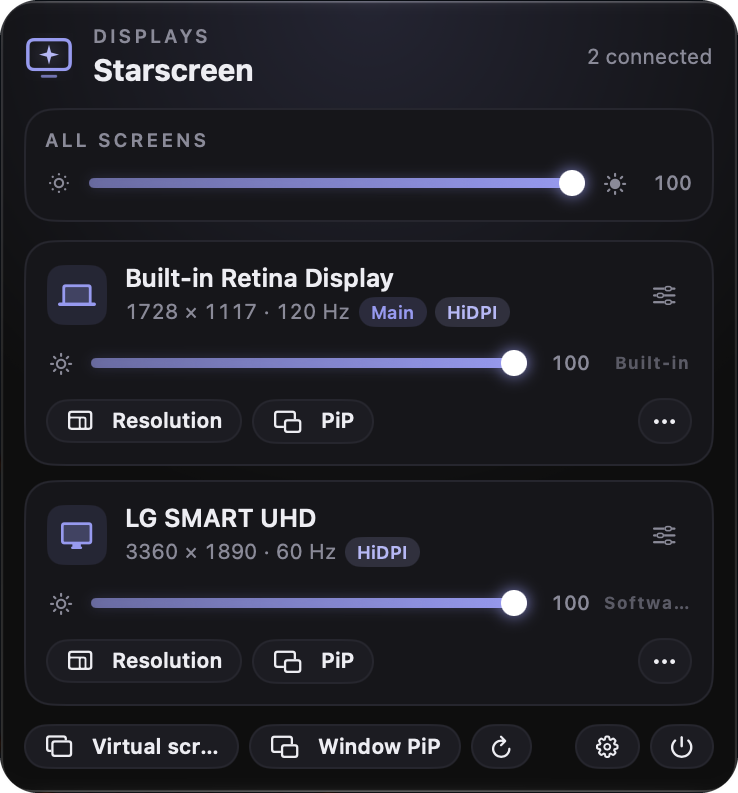
Every display.Under control.
Brightness on any display
Your Mac's screen, external monitors via DDC, and software dimming for everything else.
HiDPI on any monitor
Crisp text even on 1440p and 1080p monitors.
Virtual displays
720p to 5K, ultrawide, portrait or projector — great for testing projection outputs or using your Mac without a monitor.
Picture-in-Picture of a display
Watch the big screen or projector in a floating window.
Monitor volume & input
Switch between HDMI, DisplayPort and USB-C without touching the monitor.
Warm color & contrast
Tune color warmth and contrast for each display.
Window PiP
Float any single app window on top of everything — great for tutorials, calls and monitoring.
One slider for all screens
Dim or brighten every display at once, then fine-tune each one.
Resolution & refresh rate, at a glance
See each display's resolution, Hz and HiDPI status and switch modes right from the menu.
Free forever
Free
- Brightness
- Color
- Contrast
- Resolution
- Main display
- Mirroring
Unlock the advanced tools
With a license
- HiDPI
- Virtual displays
- Picture-in-Picture
- Monitor volume & input
- Turn displays off
- URL shortcuts
Simple pricing
Pay once.Keep it forever.
Launch price
Lifetime license
one-time payment
- Use on up to 3 Macs
- All 1.x updates included
- 14-day refund, no questions
- Every feature unlocked
Questions